Search This Website

Showing posts with label Adhar card. Show all posts

Thursday, November 11, 2021

UIDAI launches new support app 'mAadhaar', supporting 13 languages

UIDAI launches new support app 'mAadhaar', supporting 13 languages
With the goal of reaching out to large numbers of smartphone users, the new mAadhaar is released by the Unique Identification Authority of India. The App features an array of Aadhaar services and a personalized section for the Aadhaar holder who can carry their Aadhaar information in form of a soft copy, instead of carrying a physical copy all the time.


The key features in mAadhaar:
Multilingual : In order to ensure the Aadhaar Services are accessible to linguistically diverse residents of India, the menu, button labels and form fields are provided in English as well as in 12 Indian languages (Hindi, Assamese, Bengali, Gujarati, Kannada, Malayalam, Marathi, Odia, Punjabi, Tamil, Telugu and Urdu). After installation, the user will be prompted to select any of the preferred languages. However, the input fields in the forms will accept data entered in the English language only. This is done to help the user avoid facing the challenges of typing in regional languages (due to limitations in the mobile keyboards).


Universality: Resident with or without Aadhaar can install this App in their smart phones. However to avail personalized Aadhaar services the resident will have to register their Aadhaar Profile in the App.


Aadhaar Online Services on Mobile: The mAadhaar user can avail the featured services for themselves as well as for any other resident seeking Aadhaar or related help. The functionalities are broadly grouped as :


Main Service Dashboard: Direct access to download Aadhaar, Order a Reprint, Address Update, Download offline eKYC, Show or Scan QR Code, Verify Aadhaar, Verify mail/email, retrieve UID/EID, Request for Address Validation Letter


Request Status Services: To help resident check the status of various online requests


My Aadhaar: This is a personalized section for Aadhaar holder where the resident will not have to enter their Aadhaar number to avail Aadhaar services. In addition, this section also provides facilities for the resident to lock/unlock their Aadhaar or Biometric Authentication.


Aadhaar Locking – Aadhaar holder can lock their UID/Aadhaar number anytime they wish.


Biometric locking/unlocking secures biometric authentication by locking biometrics data. Once the resident enables the Biometric Locking system their biometric remains locked till the Aadhaar Holder chose to either Unlock it (which is temporary) or Disable the Locking system.


TOTP generation – Time-based One-Time Password is an automatically generated temporary password that can be used instead of SMS based OTP.

Update of profile – To updated view of Aadhaar profile data after successful completion of update request.

Sharing of QR code and eKYC data by Aadhaar Number holder helps Aadhaar users share their password-protected eKYC or QR code for safe and paperless verification.


Multi-profile: Aadhaar holder can include multiple (up to 3) profiles (with the same registered mobile number) in their profile section.

Aadhaar Services on SMS ensures Aadhaar holder avail of Aadhaar services even when there is no network. This needs SMS permission.


Locate the Enrollment Center helps the user find the nearest Enrolment Center.
Read More »

Sunday, September 12, 2021

How To Check Adhar card and pan card Linked successfully or not

How To Check Adhar card and pan card Linked successfully or not
Linking your PAN card with Aadhaar has been made mandatory for certain services, such as filing your income tax returns. As per a recent directive from the Central Board of Direct Taxes (CBDT), the last date to link PAN with Aadhaar is sep 2021

If you want to link your Aadhaar with your PAN card, you can visit 'How to Link Aadhaar Card and PAN Card' for more information

If you have already linked/seeded your PAN with your Aadhaar, you can check the status both online as well as offline.

The Income tax Department's e-Filing portal provides an easy and simple way to link your Aadhaar card with PAN card as well as to check the same.

Simply Follow The Below Steps To Check The Status Of Your Pan Card Seeding With Aadhaar.


Visit www.incometaxindiaefiling.gov.in/aadhaarstatus

Enter PAN and Aadhaar Number
Click on 'View Link Aadhaar Status'
The status of the linking is displayed in the next screen

This is how to check if there is a base-pen link
First go to the official website of the Income Tax Department incometax.gov.

At the bottom of the link support status will appear here, click on it.

Then another page will open where you have to enter your Aadhaar and PAN number and click on View Aadhaar Link Status.

As soon as you click on it, the information will appear on the screen with the support pen or not.
You can link support-pen with one message

For that you have to type UIDPAN in your phone. Then you have to enter your Aadhaar number by giving space and then enter the pen number by giving space.


IMPORTANT LINK:::


For example: Text UIDPAN 0000011112222 AAAPA7777Q to 567678 or 56161.

The income tax department will then put you in the process of linking the two numbers.

Can link online support-pen

First go to the official website of the Income Tax Department incometax.gov. It will have the option of link support at the bottom. Clicking on it will open a new page.

In it you have to enter the PAN number, Aadhaar number and the name registered in the Aadhaar card and click on the link Aadhaar.

The income tax department will then put you in the process of linking the two numbers.
Read More »

Monday, December 14, 2020

How to Request for PVC Aadhaar Card online||@residentpvc.uidai.gov.in

How to Request for PVC Aadhaar Card online||@residentpvc.uidai.gov.in
How to Request for PVC Aadhaar Card @residentpvc.uidai.gov.in
UIDAI (Unique Identification say-so of India) has in recent times introduced the let loose of PVC based Aadhaar card. This license is effortless to contain and is durable. It will take part in a digitally signed protected QR set of instructions with photographs and demographic information equipped with loads of safety measures features. UIDAI says that uniform if your mobile numeral is not registered with the Aadhaar card, you be capable of send off for this card.

The government, to tackle this problem, has launched PVC Aadhaar Card. PVC stands for Polyvinyl Card, which looks analogous to the extent of an ATM Card. One bottle include the PVC Aadhar license in their wallet simply as of its lesser size. Moreover, the citizens know how to advantage of these portable sized renew Aadhar Cards registering on the officer porch residentpvc.uidai portal.
Features of the PVC Aadhaar Card

It is other durable, handy to carry
It has fine printing class and it comes with lamination
It has the hottest safety skin texture together with a hologram, Guilloche Pattern, ghost image & Microtext.
The certificate is entirely weather-proof.
It contains the pressed Aadhaar logo.
What are the charges for applying for the Online Aadhaar PVC Card? distinct will hold to forfeit a nominal fee of Rs 50 (inclusive of GST and rush station charges) time ordering the PVC Aadhaar certificate


How to Request for PVC Aadhaar Card at residentpvc.uidai.gov.in
  1. First visit https://uidai.gov.in or https://resident.uidai.gov.in.
  2. Click on ‘Order Aadhaar Card service. [Direct Link]
  1. Enter your 10-digit Aadhaar number (UID) or 16-digit Virtual Identification Number (VID) or 28-digit enrollment ID.
  2. Note the security code.
  3. Select the option of registered number to get OTP. If the mobile number is not registered, fill in the optional number if available.
  4. Click on ‘Send OTP’.
  5. Tick ‘Terms and Conditions’ after approval. (Note: Click on the hyperlink and see the details)
  6. Click ‘Submit’ after completing the ‘OTP’ verification process.
  7. After clicking on ‘Make payment’, you will be taken to the payment gateway, where you will get the option of Credit / Debit Card, Net Banking and UPI.
  8. Receipt of payment will be successful, it will have digital signature on it. You will get the service request number on SMS. You can use this number to track the process until the card is delivered.


Important Notes for Request PVC Aadhaar Card
  • Order Aadhaar card by paying Rs 50/-(inclusive of GST & Speed post charges)
  • Use your Aadhaar Number/Virtual Identification Number/EID to order Aadhaar card.
  • Aadhaar card comes with security features i.e. Digitally signed Secure QR code, Hologram, Ghost image, Guilloche pattern etc.

The Unique Identification Authority of India (UIDAI) has introduced various forms of Aadhaar from time to time for the convenience of residents:

Aadhaar Letter: Paper-based coated epistle with safe QR policy with come out see and characters Date. Aadhaar memo is sent to occupier free of expense by regular place in casing of new enrolment or mandatory biometric update. If the Aadhaar epistle is puzzled or destroyed, the dweller be capable of contract a reprint online at a outlay of Rs. 50/- from UIDAI’s bureaucrat website. Reprinted Aadhaar epistle is delivered to the local by burn rubber post.


eAadhaar: eAadhaar is the electronic found of Aadhaar, digitally signed by UIDAI, having QR rules for offline verification with deal out day and Download Date. inhabitant bottle certainly download eAadhaar/masked eAadhaar from UIDAI’s formal website via registered mobile number. The covered eAadhaar displays just keep going 4 digits of Aadhaar number. eAadhaar is generated consequentially with every Aadhaar enrolment or keep informed and it bottle be downloaded free of cost.


mAadhaar: mAadhaar is digital manner of Aadhaar which be capable of be installed on mobile device. mAadhaar app is existing on Google amuse yourself store/iOS for downloading on resident’s mobile device. It has QR set of laws for offline verification. Like eAadhaar, mAadhaar is moreover generated robotically with every Aadhaar enrolment or keep informed and it canister be downloaded free of cost.


PVC Aadhaar Card: PVC Aadhaar certificate is the most recent kind of Aadhaar introduced by UIDAI. Other than existence calm to keep and durable, the PVC-based Aadhaar certificate has a digitally signed self-confident QR convention with photograph and demographic information with many protection features. It preserve be controlled online through uidai.gov.in or resident.uidai.gov.in by means of Aadhaar number, Virtual documents or Enrolment identification and paying a nominal responsibility of Rs. 50/-. Aadhaar PVC certificate is delivered to the resident’s tackle by burn rubber post.
Read More »

Saturday, December 5, 2020

Track aadhaar card postal status-aadhar card history

The status of Aadhar's postcard can be checked online on the India Post website. We will send you the Aadhar card within 1-2 weeks after the verification process is complete. Did you receive confirmation of your Aadhar card during the registration process? It contains a registration identification number that helps several carriers, including the Indian Postal Service, track the delivery status of Aadhar cards. If you have not received your Aadhar card, you need to track the postal status of your Aadhar card so you can easily find it. In this article, I mentioned how to track Aadhar maps. AADHAAR Card Mail Status Tracking


The 12-digit Aadhaar number aadhaar registered mobile number to receive the one-time password

Track aadhaar card postal status-aadhar card history


track aadhaar card postal status

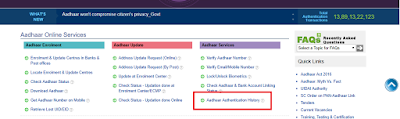
Step 1: Visit the UIDAI’s official website that is https://resident.uidai.gov.in/.

Step 2: Once you are on the UIDAI’s home page, select “Aadhar Authentication History” link under the Aadhaar Services column.
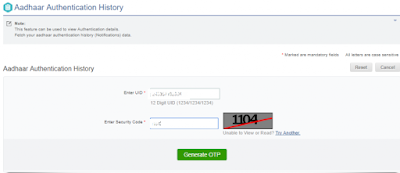
Step 3: Then it gets directed to a new page named Aadhaar Authentication History. You should enter the UID/ the 12-digit Aadhaar number.

Step 4: Enter the security code correctly in the respective box and click on “Generate OTP”.
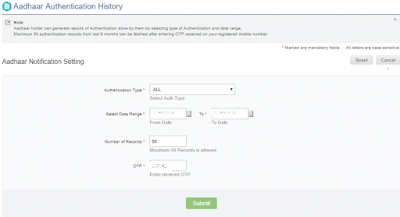
Step 5: On the new page titled “Aadhaar Notification Setting”, select the “Authentication Type” by clicking on the drop down arrow.

Step 6: You should choose the start and end date from the calendar for which you want to check the history.
Step 7: Next, enter the number of records and the OTP in the respective box and click on “Submit” button.
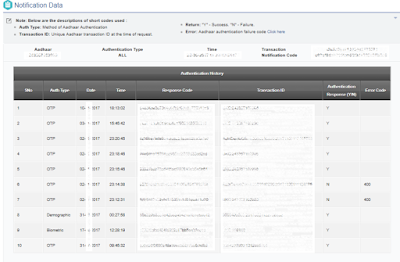
Step 8: On completing these, UIDAI displays the history in a tabular format that includes date, time, type ID and authentication type among others.

Step 9: You can now cross-check the authentication of the information.
Documents Needed to Check the Aadhaar Authentication History Online
There are only two prerequisites for checking the authentication. It includes...
Read More »